

AUM introdues Unique Insure Mobile App
Our UNIQUE Insure app is a new, slick, easy and convenient way for your clients to manage their insurance claims, access emergency assist services and get amazing loyalty offers in the palm of their hands!
The UNIQUE features of the app include:
• UNIQUE Claims Service - Easy access to Vehicle, Household and Windscreen Claim forms with simple prompts to assist clients in managing the scene of the incident as well as the ability to upload incident specific photos.
• UNIQUE Policy Service which includes the ability to view their policy details and premium on the app.
• UNIQUE Reminders Service - friendly reminders to let you know what you are covered for in case of an emergency.
• UNIQUE PANIC Assist - Panic button which sends and instant distress signal with your clients vital details to the Emergency Call Centre for immediate action 24/7/365
• UNIQUE Emergency Assist Services – Includes quick-dial access to Roadside Assistance (including Accident Tow Assistance & Breakdown Assistance), Home Assistance, Medical Assist Access, directions to nearby emergency services and the ability to save your personal security and medical details on the app.
• New value-added services like Home and Convenience Drive (with a built-in booking engine), Bail Protect and Pothole Protect can also be accessed at the click of a button!
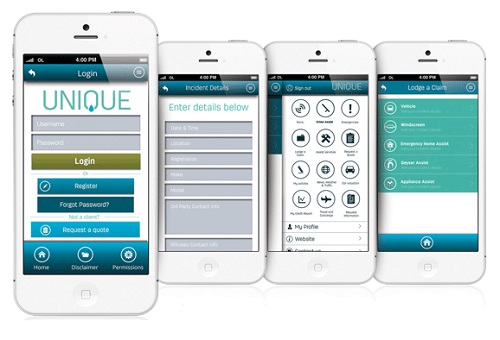
Added extras include News, Weather and Traffic updates, the ability to request an insurance quote, competitions, special offers and more!
The app is absolutely free for clients who take out our UNIQUE Insure Assist Services, which will cost them just R29,50 a month.
How to download the app: Click on one of the icons below.



How to register on the app:
Option 1:
If you are not a Unique Insure Policy Holder, you can access the app for a limited time only by to view the functionality, by entering the details below on the Login Screen. You do not need to complete the Registration Form: Username: demo Password: demo
Option 2:
If you have a Unique Insure Policy and you are the Main Policy Holder, you can easily access the app by completing Registration Form on the app. You need to enter your ID number correctly to gain access to the app and view your personal Policy Information.
Option 3:
If you have a Unique Insure Policy, but you are NOT the Main Policy Holder you will need to enter the Main Policy Holder’s ID number together with your own, unique, Username and Password for security purposes on the Registration Form to gain access to the app and view your Policy Information. Additional users that are linked to the Main Policy Holder will be able to download and register by using the Main Policy Holder’s ID number.

